Posted On April 21, 2022

How to import theme demo data?

aliana 0 comments
Order Page | Aliana Cafe & Bakery >> Uncategorized >> How to import theme demo data?

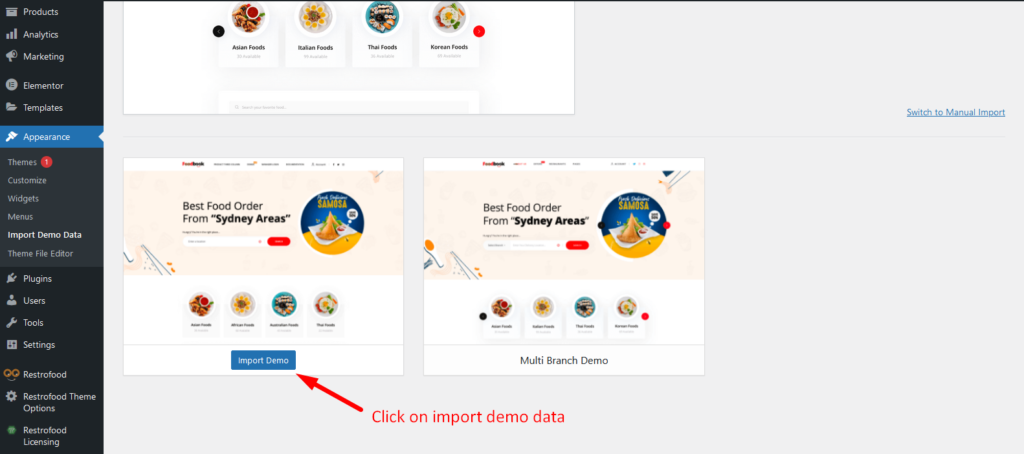
Restrofood Theme provides a one-click demo import system. So you could import demo data like our demo site easily. Before installing demo data you should install all required plugins and active restrofood plugin license.

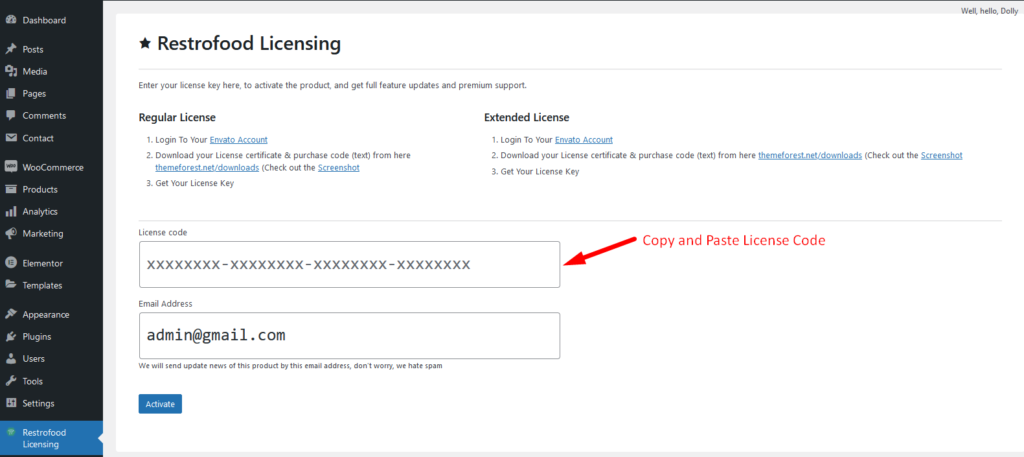
Before import demo data make sure you have activated the restrofood license:
Import demo data:
Leave a Reply

Your email address will not be published. Required fields are marked *

Related Post

Where you will find a print button to print the invoice?

You will find the print button in the order details popup:

How to create google API key?

To create google API key visit the link https://console.cloud.google.com/ and login with your google access.…

From where you will set the invoice printer type?

Invoice type settings option: Normal Printer layout: Thermal/Receipt Printer layout: